
Explore Latest Blog & News at Premier Aftermarket Auto Parts Store

Connecting Grandwest (Catalog)
1. Open your Shopify store 2. Open the “Slingshot Automotive” app 3. Click “Settings” 4. Click “Catalogs” 5. Scroll down to “Grandwest Catalog” and click “Connect” 5. Contact your Grandwest sales representative and ask them to set up your catalog data feed. They will provide you with an account number to use with your integration
Read More
Connecting MotorState (Catalog)
1. Open your Shopify store 2. Open the “Slingshot Automotive” app 3. Click “Settings” 4. Click “Catalogs” 5. Scroll down to “MotorState Catalog” and click “Connect” 6. Enter your PriceGuidePro credentials and click “Accept”
Read More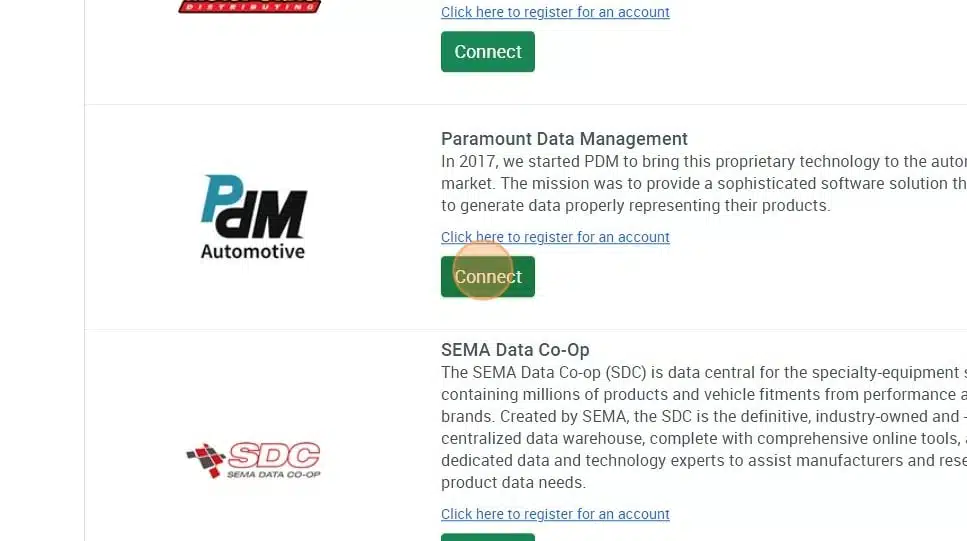
Connecting Paramount Data Management (PDM)
1. Open your Shopify store 2. Open the “Slingshot Automotive” app 3. Click “Settings” 4. Click “Catalogs” 5. Scroll down to “Paramount Data Management” and click “Connect” 5. Email Support@dataheretothere.com and request an FTP be created for you for PDM. Include the name of your store and URL in this email. 6. Follow this guide to setup PDM’s side of
Read More
Connecting Western Power Sports (WPS)
1. Open your Shopify store 2. Open the “Slingshot Automotive” app 3. Click the “Settings” tab 4. Scroll down to Western Power Sports and click “Connect” 5. Enter your WPS API key and click “Accept” Your WPS API key can be requested from your WPS account manager, contact webservices@wps-inc.com for assistance.
Read More
Connecting DIX
1. Open your Shopify store 2. Open the “Slingshot Automotive” app 3. Click the “Settings” tab 4. Scroll down to DIX and click “Connect” 5. Email Support@dataheretothere.com and request an FTP be created for you for DIX. Include the name of your store and URL in this email. 6. Email your DIX account representative the provided FTP
Read More
Connecting CTP (Catalog)
1. Open your Shopify store 2. Open the “Slingshot Automotive” app 3. Click the “Settings” tab 4. Click “Catalogs” 5. Scroll down to CTP and click “Connect” 5. Email Support@dataheretothere.com and request an FTP be created for you for the CTP Catalog. Include the name of your store and URL in this email. 6. Email your CTP
Read More
Connecting Thibert
1. Open your Shopify store 2. Open the “Slingshot Automotive” app 3. Click the “Settings” tab 4. Scroll down to Thibert and click “Connect” 5. Enter your FTP credentials and click “Accept” FTP Credentials can be obtained from your Thibert account manager, contact infoecommerce@rthibert.com for assistance.
Read More
Connecting SSF
1. Open your Shopify store 2. Open the “Slingshot Automotive” app 3. Click the “Settings” tab 4. Scroll down to SSF and click “Connect” 5. Enter your Account number and SFTP credentials, then click “Accept” Account number and SFTP credentials can be obtained from your SSF representative. For assistance, contact info@ssfautoparts.com
Read More
Connecting Premier
1. Log into your Premier portal account using the credentials you received from your Premier representative. 2. Go to the ‘My Data’ menu and select ‘Custom Data Feed’. If you do not have this menu, please contact your Premier representative to have it enabled. 3. Select the “Standard” option. 4. Scroll down to the vendors section. Press
Read More
Connecting Parts Authority
1. Open your Shopify store 2. Open the “Slingshot Automotive” app 3. Click the “Settings” tab 4. Scroll down to Parts Authority and click “Connect” 5. Enter your FTP credentials FTP Credentials can be obtained from your Parts Authority account manager, contact contactus@partsauthority.com for assistance.
Read More