
Explore Latest Blog & News at Premier Aftermarket Auto Parts Store

DH2T Tutorial Library Now Available for Slingshot Automotive and Turn 14 Distribution App Users
You asked, and we delivered! DH2T now offers a comprehensive suite of tutorials and help articles to make mastering the Slingshot Automotive and Turn 14 Distribution apps simpler than ever. These step-by-step guides empower you to unlock the full potential of each platform, streamline your workflows, and drive success in your automotive e-commerce business.
Read More
Can I use Slingshot Automotive along with the Turn 14 Distribution app?
Yes, both apps can be used simultaneously, however there is no check in place for the same product being loaded by both apps. Thus, if the same brand is enabled in both the Turn14 app and the Slingshot app, then you will encounter duplicate products loading into your store. We recommend only enabling a brand
Read More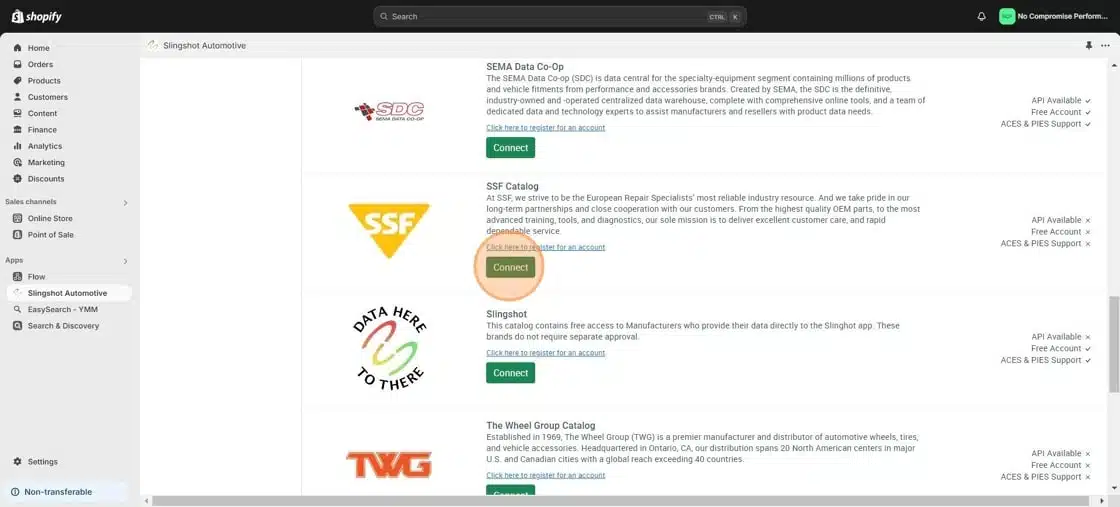
Connecting SSF (Catalog)
1. Open your Shopify store 2. Open the “Slingshot Automotive” app 3. Click “Settings” 4. Click “Catalogs” 5. Scroll down to “SSF Catalog” and click “Connect” 5. Enter your Account number and SFTP credentials, then click “Accept” Account number and SFTP credentials can be obtained from your SSF representative. For assistance, contact info@ssfautoparts.com
Read More
Connecting the Slingshot (DH2T) Catalog
1. Open your Shopify store 2. Open the “Slingshot Automotive” app 3. Click “Settings” 4. Click “Catalogs” 5. Scroll down to “Slingshot” and click “Connect” 6. Click “Accept”
Read More
Connecting Western Power Sports (WPS) Catalog
1. Open your Shopify store 2. Open the “Slingshot Automotive” app 3. Click “Settings” 4. Click “Catalogs” 5. Scroll down to “Western Power Sports” and click “Connect” 5. Enter your WPS API key and click “Accept” Your WPS API key can be requested from your WPS account manager, contact webservices@wps-inc.com for assistance.
Read More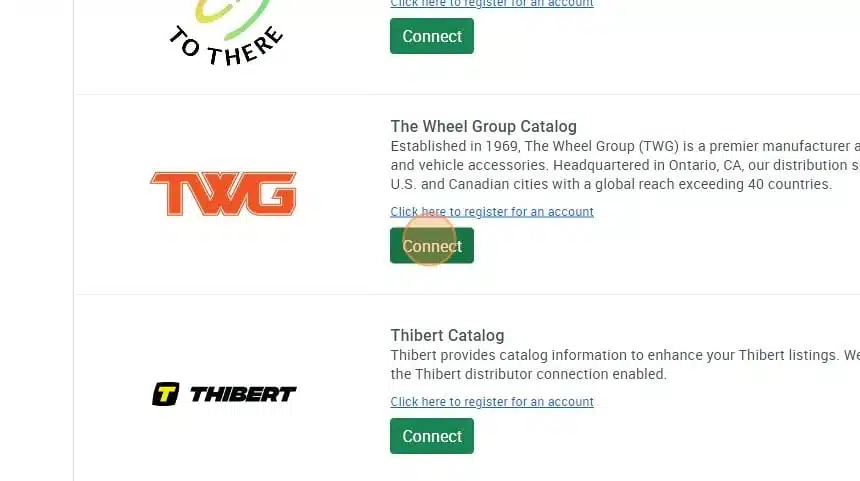
Connecting The Wheel Group (TWG) Catalog
1. Open your Shopify store 2. Open the “Slingshot Automotive” app 3. Click “Settings” 4. Click “Catalogs” 5. Scroll down to “The Wheel Group Catalog” and click “Connect” 6. Click “Accept”
Read More
Connecting Wheel Pros Catalog
**First, you must setup your wheel pros data feed, instructions on how to do so can be found here – https://dataheretothere.freshdesk.com/a/solutions/articles/69000834016 1. Open your Shopify store 2. Open the “Slingshot Automotive” app 3. Click “Settings” 4. Click “Catalogs” 5. Scroll down to “Wheel Pros Catalog” and click “Connect” 6. Enter your SFTP Credentials you created when
Read More
Shopify Limit Reached Error Message
The message you’re seeing is an indication that you reached the Shopify 50,000 product limit. You can click the blue details link and see more information. Note: This is not a limitation of the Slingshot app for Shopify but of Shopify itself. Unless you have a Shopify Plus account you will run into 50,000 product
Read More
Keystone Shipping Rates for Hawaii and Alaska
• Customer’s current UPS Ground flat rate shipping applies to all Alaska and Hawaii UPS ground shipments • In addition to the flat rate, a $20 handling fee is charged to cover the additional shipping costs – This fee remains constant for all UPS ground shipments • All standard accessorial fees will apply as they normally
Read More
Keystone Order Automation Setup
To enable order automation with Keystone, follow the test order guide available here – https://dataheretothere.freshdesk.com/a/solutions/articles/69000840468
Read More