Connecting AllPro

1. Open your Shopify store

2. Open the “Slingshot Automotive” app

Data Here-to-There Inc. | Connecting AllPro

3. Click “Settings”

Data Here-to-There Inc. | Connecting AllPro

4. Scroll down to “AllPro” and click “Connect”

Data Here-to-There Inc. | Connecting AllPro

5. Enter your FTP credentials and click “Accept”

FTP Credentials can be obtained from your AllPro account manager, contact customercare@allprodistributing.net for assistance.

Data Here-to-There Inc. | Connecting AllPro

Share:

More Scribes

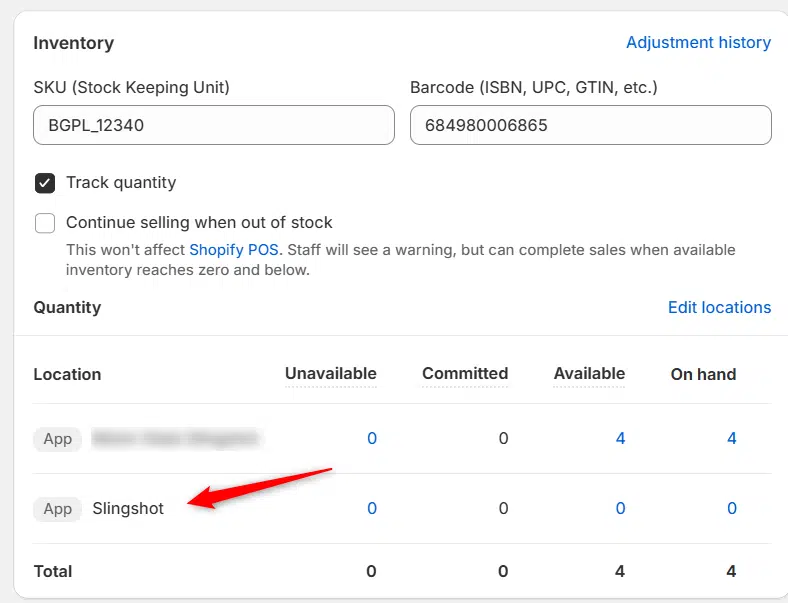
multi location inventory

Multi Location Inventory

Previously we had all skus showing a single location called the “Slingshot App”, however we received a lot of requests
Create Parent collection in Shopify

Create Parent collection in Shopify

1. Click “Products” 2. Click “Collections” 3. Click “Create collection” 4. Click the “Title” field. 5. Enter the desired name

Add your Comment

Stay Connected

More Updates

Image of people shaking hands to highlight DH2T-Grandwest partnership.

Data Here-to-There Partners with Grandwest Enterprises

Data Here-to-There (DH2T) and Grandwest Enterprises have joined forces to launch the Grandwest Shop-in-a-Box, a ready-to-go Shopify ecommerce solution tailored for automotive parts dealers. With specialized store setups for Truck, Offroad, Vehicle Focused, and Towing, Grandwest dealers can quickly and easily take their business online.
How to Download the Pricing Report

How to Download the Pricing Report

1. Open your Shopify store 2. Open the “Turn 14 Distribution” app 3. Click “Pricing” 4. Click “Report” 5. This will download the Pricing Report
Select your currency