
How to Report an Error to SEMA Data Co-op

Once logged into your PIMS account, go to the Report An Issue section (see below).

Data Here-to-There Inc. | How to Report an Error to SEMA Data Co-op

The Report An Issue section is the second to last option on the left hand side toolbar. Once you’re in that section, you’ll see the Report An Issue form first thing. You’ll fill out the form with all your pertinent information / files, and then click submit.

Once you click submit, your request will show up on the right hand side under My Reported Issues. This opens up a ticket with our data team. They’ll fix your problem and reach back out to you within 1-2 business days to let you know your problem is resolved and you can run your export again.
Share:

More Scribes

multi location inventory

Multi Location Inventory

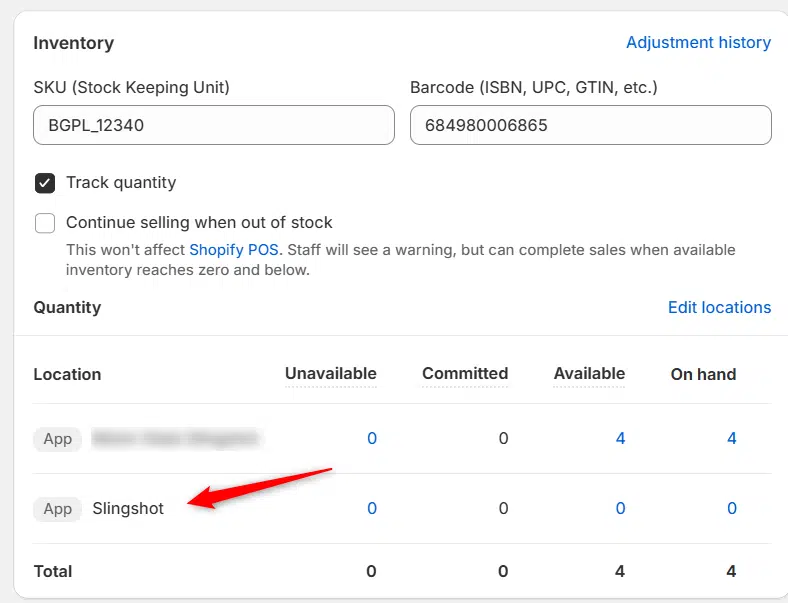
Previously we had all skus showing a single location called the “Slingshot App”, however we received a lot of requests
Create Parent collection in Shopify

Create Parent collection in Shopify

1. Click “Products” 2. Click “Collections” 3. Click “Create collection” 4. Click the “Title” field. 5. Enter the desired name

Add your Comment

Stay Connected

More Updates

How to Download the Pricing Report

How to Download the Pricing Report

1. Open your Shopify store 2. Open the “Turn 14 Distribution” app 3. Click “Pricing” 4. Click “Report” 5. This will download the Pricing Report
connect-ctp

Connecting CTP

1. Open your Shopify store 2. Open the “Slingshot Automotive” app 3. Click the “Settings” tab 4. Scroll down to CTP and click “Connect” 5.
Connecting Wheel Pros Catalog

Connecting Wheel Pros Catalog

**First, you must setup your wheel pros data feed, instructions on how to do so can be found here – https://dataheretothere.freshdesk.com/a/solutions/articles/69000834016 1. Open your Shopify store
Select your currency